Wednesday, 28 September 2016

How to Create a Sparklines In Excel 2010

Hello everyone, Today we'll discuss how to Create a Sparklines or Mini Chart in Excel. A sparkline is a tool/cell  that provides the visual(graphically) representation of data. Excel 2010 Sparklines is used to represent the data (a data which were taken in a rows or column ) creating a new cell (in row or column) and provides the tiny graph for each row or column to analyze the  data and highlights the data values to create a sparklines we need to organize data in a rows or column. It is used to show trends in a series of values, such as seasonal decreases or increases, economics cycles and to highlights a maximum or minimum values of the data.in Excel Sparklines chart have different charts and each chart has its own advantages. This tutorial helps you how to create the sparklines in various types different data and create a chart by using it.


Create a Sparklines | Inline-chart 

Sparklines are small, lightweight graph, that fits into a single cell .when we represent our data in a graphically form or chart form we need to organize data in a rows or column, it is easily understood and it clearly shows the lowest or highest point,economically cycle.here we discuss some point about the chart.So,here we understand how to create sparklines in excel by following some few steps which are:
  • Select an empty cell or rows or column cell  in which you want to show the "Sparkline".
  • Click "Insert" tab. 
  • In the sparkline group, select the sparklines types.
  • A Dialogue box appears, asking for the data range.
  • Click on the icon Data Range and enter the range.
  • Now, click ok.
  • The chart will be shown in the spreadsheet.


  • if you want to show the sparklines in multiple cells, Select the Location range.
  • Click,ok


So, this was all about how to use Excel Sparklines. If you wish to make a sparklines chart that looks different than the simple chart, then after you create the sparklines chart , you can control which data values are points(such as high or low,first or Last and any negative data values). there are many options available .You can do Formatting, add markers, axis etc to enhance the sparklines. Excel sparklines chart allow creating sparklines in the type of Line,Column,Win/Loss. So, we will discuss all types of charts and their formatting .


Types Of Sparklines

Line Chart

These Sparklines are displayed in the format of simple lines ,in this data points are connected with lines to see whether a increases or decreases over a time which is easy to read.The line in excel is used to display the trends over time. A line chart is a default option for sparklines,there is no need to specify this as it would be redudant.you could change the sparklines color,markers colors,style of line.To create a line sparklines follow some steps:
  • Select the range of the input data,
  • Click on the insert tab.
  • Select line from the sparklines.
  • Select the data range where you want to insert the Line sparklines.
  • Click  Ok.


  • Highlight the highest point/low point in the chart.
  • Select any color /style from the drop-down list.
  • Get the result.


Column Chart

These sparklines are displayed in the column of bars.If the data which we will enter have a positive value then the bar column will be lying in the upper axis,or if the data consist of negative value then the column will lie below the axis and data have a zero value then column will not be displayed and empty space would be left at the data point and you can change the sparkline color ,style .To create a column sparklines follow some steps.
  • Select the range of an input data.
  • Click on the insert tab.
  • Select column from the sparklines.
  • Select the data range where you want to insert the column sparklines.
  • Click,Ok.
  • Select any color/style from the drop-down list.
  • Get the result.


Win/loss Sparklines:

These sparklines similar to the column but the difference is that these only represent profit/Loss. It shows a positive or negative situation of data in a distinctive way. It is very easy to create.
To create a win/loss sparklines follow some steps:
  • Select the range of input data.
  • Click on the insert tab.
  • Select Win/Loss from the sparklines.
  • Select the data range where you want to insert the Win/Loss sparklines.
  • Click Ok.
  • Select the marker color, change the color of negative values.
  • Click on the negative point and select a color.
  • Get the Result.


Conclusion:

Thus, in this post, we discussed How To Create a Sparklines In Excel. Sparklines are simpler  than Charts but not a versatile. Sparklines are the tiny graph that fit into the one cell and gives you the clear graphical presentation of the data. We hope you will like this article, if you like this article then you can share with your friends and colleagues. We will update the information on the regular basis. You can also share this post on social media websites like facebook, twitter, Instagram or other social media websites. If you have any doubt regarding this post you can freely write your query in a comment section. We will revert back to you as soon as possible.

Sunday, 18 September 2016

Targeting Accounts - A Specialist’s Role

I attended a day long distributor planning session, a sales meeting that ended with a “round-robin” planning session.  Vendor salespeople and Distributor Specialists were assigned
tables around the perimeter of the meeting room.  Salespeople spent a few minutes at each table talking about existing opportunities and future targets.  After eavesdropping, I noticed salespeople discussing accounts where they felt additional actions could push the selling process forward. 

Soon after the meeting, it hit me like a ton of bricks. Salespeople knew their assigned accounts but didn’t fully understand the targeting process.  At the end of the day, nearly every salesperson listed the same three or four accounts as their targets – the same accounts and contacts were given for a diverse group of products and technologies.  Later, I asked a couple of salespeople and their managers to define “target” – the results were interesting:
·         “A target account is a new account”
·         “exploratory” 
·         a target should be “one of my top 5 accounts.”

All answers came from the same sales team, same management, attending the same meeting.

Vendor salespeople were no different.  When asked for a “target” for their new product line, one district manager rattled off:  Forest Products, Mining, Food Processing, and Automotive Industry.  Why was this particularly bothersome?  The nearest Forest and Mining businesses were thousands of miles away.   To a salesperson thinking about targets, this sends two messages, “My vendor doesn’t even know a target for my territory” and “this product may not deserve my selling time.” 

Proper targeting is the key to successfully launching new products.  Human nature drives a desire to produce fast results.  Dr. Robert Atkins, inventor of the Atkins Diet, stressed the need for an initial quick success in weight loss to drive future behavior over a long period of time.  Dr. Shinichi Suzuki discovered that children who experienced quick success in music were more likely to continue their
studies, even once practice became routine.  Specialists can drive a result by “stacking the deck” for early success.  This creates the initial one or two wins that build long term success.  Since you are responsible for getting the new products into your company’s sales pipeline, time invested early thinking about targets pays important dividends. 

For each new product answer the following questions:

Which customer types would best benefit from the product?
This should be answered in as specifically as possible.  A bad example would be General Motors – a good answer would be the painting department of a large metal assembly company (General Motors) where explosive paint fumes create the need for tools with special arc proof coating.  This opens the door to thoughts about a number of different companies where the environment is similar.  Vendor partners and nationally based organizations like to use SIC codes to make these decisions.  Unfortunately, the SIC registry is not an exact science.  I suggest you put your personal knowledge and your team’s knowledge, to work in developing a short list.

Who at these companies is most likely to understand the impact of the benefit?
Hopefully your salesperson has multiple account contacts.  Careful thought should be given to selecting the right contact.  If your product has a safety feature, showing it to a maintenance person may prove to be disastrous.  She may judge your product based on it being difficult to use rather than the importance of added safety.  This is as important as selecting the client company.

Do you (or the vendor salespeople) know of companies experiencing success in some other part of the country/territory?  What drove their success?
Nothing can jump start the success of a new product like an introduction to the local plant of a company that has already experienced success.  Before adding these people to your list, it is important to know a few details.  What were the situations leading to the use?  What went well?  What was learned?  How well has this been publicized to the company in general?   Make contact with the key decision maker at the remote location.  Call for these details to make the success story more valid for local users.

Once you have this information and the opportunity presents itself, Specialists can gain buy-in from the salesperson.  Discuss your ideas for quick successes.  Whenever possible, overlay your choices with her own top accounts.  It is easier to sell more to existing accounts.  When you are finished with the initial process you should have the following information:
  • Target Account names: No more than 6
  • The right contact: By name or Title
  • Proper collateral materials: Literature, demos, samples, joint call dates
  • A few specific bullet points to use in selling the product: Remember salespeople have dozens of accounts
  • A mutually agreed upon time frame for initial contact

Targets need to be revisited.  After the salesperson’s first
customer meeting, the Specialist can help fine tune the Targeting process by discussing the high and low points of the call.  If new collateral is needed, it can quickly be brokered to the salesperson.  If the demo didn’t go smoothly, a personal tutorial will rebuild confidence and drive better demos at the next Target.  If this meeting produces major discoveries, i.e. the competition has the same thing at 10% lower price, adjustments can be made for the entire sales organization. 


Targeting accelerates business growth, but is this worth the effort?  Here is a parting thought; new research indicates that organizations who are great at targeting are 47% more effective than those with average targeting skills.  Specialists are uniquely qualified to make an impact!  Good luck and happy targeting.

Sunday, 21 August 2016

Fall Tune Up for Distributors

Let’s face it, summer time is filled with distractions.  Our
customers are distracted; they have vacations, kids playing Little League, golf leagues, cabins in the woods, lawns to mow and who knows what else.  This distraction is contagious.  Being people too, distributor folks get caught up in all the summer stuff. 

Sometime around September 1st, we snap out of our summer induced behavior and put our noses to the grindstone.  For the next week or so, we are going to talk about a few fall tune-ups for distributors.  Think summer end elixir for a better year end. 

If ever you planned to institute a new habit, this is the time.  For the next four minutes, let’s think about selling time.  We’ll ask a few questions:  How much time do our salespeople spend selling?  What distracts them? How might we put the beauty back into the process?

How much time do salespeople spend actually selling?
Based on observations of hundreds of salespeople and dozens of distributors, the answer is simple: not much.  Without getting into anything earth shattering, we can subtract vacation, holidays, training sessions, sales meetings and sundry interruptions.  Vacation, holidays and personal time for life issues alone typically account for nearly 8 percent of the work year.  Let’s add in a few sales meetings, training sessions, and off-site vendor meetings and we could easily come to some interesting conclusions.  First, let’s assume salespeople are paid to “sell,” yet they’re away from their job for more than 10 percent of the time.  Secondly, the seller spends just one day per week doing administrative “paperwork.”  We’ve somehow managed to drop time spent selling by another 15 or 20 percent.

 This brings the total time engaged in face-to-face selling activities down to 70 percent of the real year.  This is the functional equivalent of being paid regular wages for an 8 to 1:30 workday.  But those are just the mechanics.  For the next five minutes, let’s look at how we drop from 70 percent to the actual number, which experts have pegged at around 25 percent.

Salespeople, please continue to read…
This is not about sales department slacking.  While we may touch up against the need for planning, scheduling and effective use of time, this article isn’t about calendar management.  Instead, it’s about sales management.

What takes salespeople away from selling?
Operational issues are a major source of sales distraction.  Think back to the last time you went out with a member of your sales team.   Was a portion of the sales call devoted to discussing shipping errors, delivery issues or a poorly handled customer service issue?  Nothing sours a well-planned sales call like a little back peddling early in the meeting.  It’s hard to sell “ease of doing business” when you just cost your customer money based on something easily avoidable.

What’s worse for many distributor managers is this:  Most lack the data to determine if their growth problems are based on a sloppy warehouse and a crappy customer service department or an ineffective sales team.  Some wonder if customer issues with missed delivery dates or inaccurate shipments are just part of the “distributor sales game.”  With this in mind, one would wonder if gathering administration and logistics data shouldn’t be a standard procedure for every distributor.   We think it should be.

Pricing situations can spoil a selling situation.  While we could argue that price negotiations are an integral to selling, I believe we need to explore a couple of points. 

First, unless you have accurate pricing information loaded into your ERP system, just arriving at a valid price provides a selling distraction.  Each transaction requires additional research.  Every time a salesperson quotes an amount to a customer, a dozen questions flash through their mind.  Is the price right?  What price did we use last time?  Could someone in customer service have priced this differently?   Where do we sit compared to the competition?  And more.

Not only is time spent researching for the right price, we also create doubt and uncertainty.  When the salesperson guesses incorrectly, it creates additional distraction.  The salesperson spends even more precious selling time fixing the issue.

Secondly, when no selling process exists, the salesperson is stuck negotiating every single sale.  To summon up something said by my friend and pricing expert David Bauders of Cleveland-based Strategic Pricing Associates, you never see a dog beg just once.  His point is simple: If you give your dog table scraps one time, they turn into constant beggars.  When our salespeople lower their prices once, the customer becomes conditioned to request a lower price on each opportunity.  Negotiations take away from, you guessed it, selling. 

Unless the distributor employs a full-on pricing process, salespeople are left to determine price.  Customers bombard them with the message “your price is too high,” and it ruins the selling moment.  This constant bombardment of negative energy causes many sellers to lose perspective on the value their organization provides to customers.   Sales experiences, without the presence of value-creating solutions, are about as exciting as the paint page of the 1964 Sears catalog.  


Management teams syphon selling time on a regular basis.  Earlier, we listed all of the mundane consumers of time (vacation, sales meetings and so on,) but many times managers hurt their own cause by not thinking of the sales team when they set up meetings.  Any meeting scheduled for midday consumes the better part of a whole day, even if it only lasts an hour.  This is especially true when ending times are not strongly enforced. 

The office is not the salesperson’s friend, specifically, the practice of starting a business day in the office.  It puts the kibosh on selling efficiency.  Nothing cuts into sales time like being readily available at the launch of a business day.  Here’s why.

It’s natural for customers to ask for their salesperson on some of the most routine issues.  The sales DNA steers the seller toward helpful behavior.   They get wrapped up in lots of trivial tasks that should be funneled to someone in customer service.  What’s worse is this: Customer service people often don’t understand it’s their job to get the salespeople outof the office.  I have seen inside salespeople and customer service representatives complain when sellers refuse to handle incoming calls.  This quickly becomes a management issue.  You cannot afford for salespeople to handle things like order entry, stock checks and routine expedites.

How do we ramp up the real selling activities?
It’s a management-driven process.  First, you must ensure the distractions are removed.  Distributor selling today is a team sport.  Some of these are not directly tied to outside salespeople.  Metrics and measures must be inserted throughout the whole of the customer experience. 

You must develop performance expectations for all components of the selling machine.  Here’s a fact: Many sales types confuse routine reactive care with selling.  They feel good at the end of a long day of handling administrative tasks and minutia associated with their customers.  Customer care is important, but it’s not the best use of their time.  If they must step aside from real face-to-face selling, something is wrong in another department.

Finally …
I believe in data.  Hand waving and opinions are nice.  No discussion of politics, religion or Olympic figure skating should go without them.  In our world, I’ll take data.  I regularly require my clients to take inventory of their day.  How did they really spend their time?

Here’s how it works.  I ask every salesperson to log their day
in 15-minute increments.  Simply put, I want to know what they did from 8:00 to 8:15, 8:15 till 8:30 and so on throughout the day.  If they were talking on the phone, who were they speaking to and about what?  If they were at their desk, what task was at hand?

At the end of the week, I ask for tabulations.  How much time was spent in each of 10- activities?   I insist on real-time logs, but leave the tabulation to the seller.  The end result is always eye opening for the seller and their manager.   Most can radically improve their sales effectiveness.  Why?  Well, if your sales time is hovering at around 25 percent, just a few minutes a day can ramp you to 30 or 40 percent.  That’s a big jump.


If you would like to see the 12 activities we tie to times, drop me a line.  You can log the time spent under planning and process improvement.

Tuesday, 16 August 2016

SUMIF Function : How to use SUMIF Formula in Excel

Hello Everyone, Today you'll find How to use SUMIF Function in Excel. SUMIF Function used to add the specified cells based on the single or multiple supplied criteria. Sometimes we require conditional sum in Excel then we can use this function to add all numbers in a particularly given range. SUMIF function based on the three-parameter- range, criteria, and sum_range. Every parameter has own functionality and also depends on SUMIF multiple criteria.

SUMIF Function Syntax

The SUMIF Function in Excel has the following syntax:
=SUMIF(range, criteria, sum_range)
  • Range: The range of cells calculated by criteria. It is required entity mean required for the function to work. Cells in every range must be numbers, names, arrays, references that include numbers and not contain blank and text value.
  • Criteria: Criteria is a condition that must be met for a cell and it is also required entity. The criteria should be a number, expression, cell reference, text or function. It can be simple or multiple criteria. 
  • Sum_range: sum_range is the range of cells that sum together. It is optional means, not a mandatory entity. If you skip this entity then uses range as a sum_range. 

How to Use SUMIF Function

Excel SUMIF Function used to calculate the sum of the cells in a range that be specified under certain criteria.  Here we'll discuss this function with an example of the sales table.
                                 SUMIF function, SUMIF formula, SUMIF multiple criteria, SUMIF data range
If you want to find the total sold quantity from above table then you can simply find using SUM function like =SUM(B6:B11) and get the result is 26. But you want to calculate total sales amount with criteria that you want to add all sales amount where the sales quantity is 5 and greater than 5. For that we need to remind three things:
  • The first requirement is the range. In this example, the first requirement is B18:B23 and we have the range of sold quantity of every day. It will check if they meet the criteria.
  • The second parameter is criteria or user condition like we want to add all sales amount where the sales quantity is greater and greater than 5. For this example, the second parameter is ">=5".
  • The third requirement is sum_range. In this example, the third parameter is C18:C23. SUMIF function adds all the sales amount in C18:C23 range if meet the criteria.
After applying SUMIF formula in excel worksheet, it returns the outcomes 2140 means the total sales amount is 2140 where the sales quantity is greater than or equal to 5.


Conclusion
Thus, in this post, you learn How to use SUMIF Formula in Excel. We hope you'll like this post. If you like this article then you can share with your friends, colleagues, and your relatives. We'll update the information on the regular basis. You can also share this post on facebook, twitter, Instagram or other social media website. If you have any query regarding this post then you can freely write in the comment section. We'll inform you as soon as possible.

Sunday, 14 August 2016

A Few Thoughts on The Reactionary Sales Model

Talk to any sales manager and they will tell you they want their team to be proactive.  Proactive as in sales calls, targeting, prospecting and product introductions.  Planning and setting detailed customer-centric goals is also viewed as proactive.  Sales managers preach proactivity.  Detailed studies of distributor salespeople, however, reveal a lot of folks who are anything but proactive.  In spite of the directives from their managers, a lot of these guys seem happy in their roles.

Defining Reactionary Sales…
A good many knowledge-based distributor salespeople have quietly slipped into what I call the reactionary sales model.  Here is the premise of their system:
·         The seller becomes engaged with the customer.  Sometimes this is an inherited relationship, other times, it builds gradually over time as the seller proves their worth as a provider of sound advice, support and technical assistance. The seller builds a level of trust and becomes one of those called in to assist in problem solving and solution building.
·         The seller becomes available on demand.  The deeper the relationship, the more available the seller becomes as a source of advice and assistance. It is not uncommon for sellers working in this mode to drop whatever proactive plans they may have developed to run to their customer’s location at a moment’s notice.  This activity is typically rewarded emotionally with appreciative words and with a regular stream of orders.
·         The seller develops deep loyalties with customers.   As loyalty builds, the customer begins moving business to the salesperson’s company and business grows.

Sounds pretty good so far….
But there is more, maybe even vindication.  A recent study of engineers in the OEM side of our business reveals much about the way our industry sells.  Three things are made clear in the study:
1.      Engineers prefer to request information – “don’t call us we’ll call you”.
2.      Once a salesperson is established as a source of information – they call often.
3.      Local and Regional Distributors are viewed as better sources of information than National Chains (something we have always known but didn’t have the data to prove.)


But there are problems…
The story doesn’t end with “they all lived happily ever after” because there are some issues standing in the way of great business.  While time and the nature of this post don’t lend themselves for a detailed study, we should touch on the issues.

·         This model takes time.  Engaging with customers, proving yourself and building trust take time; probably measured in years.  How long can a salesperson wait for business to come? 
·         Distributors lose customers by attrition.  Depending on the expert, between five and ten percent of our customers drop off each year.  We’re not speaking of business lost to competitors; instead customers go out of business, are purchased by another organization or move to another location.  When this happens, it takes a long time for a reactive guy to replenish their customer base.
·         Reactive salespeople are slow to introduce new products and technologies.  When salespeople operate in the reactive mode, they wait for the customer to request information.  Since the customer has someone else providing assistance with the new line of technology, the time to introduce new products is painfully slow (years.)
·         Reactive salespeople struggle to justify which account receives their high quality reactive service.  Oftentimes, reactive salespeople peak out early.  One of the main causes is they run out of time.  This level of service takes time.  If they don’t “justify” their time against customer potential or business volumes, they get consumed by helping accounts which cannot provide the necessary volume to fuel their business.  Since the emotional reward can be high from small accounts, who thank them profusely for their assistance, they struggle to prioritize their time. 

By now the point should be clear, the reactive model works but does not align itself with the goals of most distributors.  Expansion into new product technologies is hampered and organic growth is slow (even if arguably steady.)

Improving the situation…
If your team is overloaded with reactive mode sellers, you must answer this lucky seven list of questions:

1.      How can we speed up the relationship process?  We’ve determined the reactive seller is good once a relationship is built.  But, they need help with jump starting the relationship.
2.      How can we help focus their efforts?  Most sellers don’t track their time, even though CRM Systems are good tools.  If we can help them understand the value of their time, they may refocus energies on accounts with greater potential.
3.      Can we develop tools for introducing new products?  Training is the new marketing.  Are you exploring all the opportunities to increase your training portfolio?
4.      Are add on products well understood?  If the salesperson is assisting the customer with a solution, do they understand the nuances of expanding the products by providing a bigger piece of the solution?
5.      Does the reactive seller know how to leverage existing contacts to expand their customer contact base?  Since the time to build trust and establish a relationship is long, we need to find ways to leverage the relationship.  Does the seller ask his contacts for referrals within their company?  Does the reactive guy understand the importance of knowing everyone within their account?
6.      Are negotiation tools part of the reactive seller’s skillset?  Long sales cycle… check.  High service… yep.  Products customized to the customer’s needs… inherently clear.  If the seller has not been trained on negotiation tactics, there is a very good chance you are missing out.  Research indicates negotiation training is not part of the distributor vocabulary.  I have seen SPASigma’s training and believe the reactive salesperson needs all of the advantages offered.
7.      Should a reactive seller be paid the same commission as a “rain making” sales guy?  This one is a lightning rod, but I am convinced there is a difference.  Plus, reactive sellers don’t bring the same level of value to the business. 

Finally….
I’ve made some pretty brash comments.  I am sure some will disagree.  If I’ve upset you, send me a note.  Heck, post it right hear for everyone to read.  I look forward to hearing back from you.  Who knows, you might receive the River Heights Consulting Grand Prize: a postcard from Iowa.


By the way… I made reference to SPASigma’s fabulous distributor-centric Negotiation Training.  Founded by Distributor Pricing Expert David Bauders of Strategic Pricing Associates.  David has helped 500 distributors grow their gross margin (typically around 2 points) through a scientific analysis of price sensitivity and customer type.  SPASigma moves the needle forward again.  There’s a five minute video at www.SPAsigma.com.  

Sunday, 7 August 2016

Technology for the Knowledge-based Distributor

Online order entry seems to be the next big thing in distribution.  Reading the distributor trade press, we are deafened with calls urging distributors to invest in the technology.  For some, the idea makes sense.  But before whipping out the wallet, let’s put some thought into the subject. 

All of these experts trot out Amazon, W.W. Grainer and a handful of online retailers as the poster children of how online order entry has changed our world.  No doubt about it, these
folks are growing their business at the expense of brick and mortar based organizations.  True confessions here, I am a dedicated Amazon shopper; buying everything from books to dog treats.  That being said, we aren’t talking apples to apples here.

I believe most solutions oriented distributors cannot afford to make a play in the “internet store” business.  Here’s how I came to this conclusion:

·         Most solution providing distributors operate within a prescribed territory (often referred to as an Area of Prime Responsibility or APR by their supply partners.)  Pricing and other support is not extended to customers outside of this APR.  While Google provides search engine tools capable of attracting only local business, the cost and effort is higher than most distributors care to pay.

·         The big guys are investing massively in the technology.  There have been reports of Grainger spending over $300 million on the technology; Amazon has probably spent even more.  There is no way the typical, small distributor can spend that kind of money. 

·         Distributors who fall closer to our model have made large investments and report sales produced still represent less than five percent of their business. 


Complicating matters, many distributors have wrongly assumed once they invested in an internet store, the investment was over.  Keeping the store updated, working properly and viable requires an ongoing investment which provides little return to their organization.  For solution-based distributors the investment made in this technology is a poor choice because the outlay has no return for the conceivable future and moneys invested distract from investing in their real competitive strength in the market – better solutions for customers. 

Pushing our thoughts further, let’s think the concept of the online store from a couple of angles.

First, let’s consider some distributor comments related to the subject.  A few manufacturers have created portals designed to make the distributor connection to their manufacturing plants more efficient.  Wholesalers using these portals are thrilled by the ability to check stock, follow-up on shipments, order literature and track programs.  They don’t seem all that thrilled about entering orders; line item by line item into the system.  Instead, they complain about the duplication of efforts and time wasted.

The driving issue is the manual transfer of data from their own business system to the manufacturer’s business system.  Thinking about the order, the distributor must create the order on their internal system then turn around and repeat the process; two sets of key strokes, twice the order time invested.  In many cases, the orders for “reoccurring” stock products, which have been purchased in the past, are generated automatically to save admin time.  The newfangled portal created as a time saver is actually a burden.

Let’s shift gears and consider customer transactions, where the situation is similar.  They have invested in company-wide ERP systems which track the parts coming into their organization.  In the case of repairs and orders for parts already in their system, moving to an online store only creates the same duplication of effort that distributors find so disturbing.  If the order involves a solution-driven product, they most likely need the kind of support which cannot be delivered via an Amazon-esque system.  So any investment in the technology does little to move the distributor forward.

Technology still provides advantage…
If this article appears to be a technology downer, it’s not.  I do believe distributors need to make use of emerging technology, just not the type described.  There is a technology worth exploring; technology with a payback for the distributor. 

What would happen if customer orders were automatically entered into the distributor’s business system thus eliminating a great deal of the manual transfer of data from customer purchase orders to the distributor’s business system?  Such technology exists today. 

For the past couple of decades distributors and others have experimented with Optical Character Recognition (OCR) software.  At River Heights Consulting, we gave it a try seven or eight years ago.   We purchased a special scanner designed to enter business cards into our system in order to streamline the entry of information collected at various trade shows and meetings.  The problem was, it didn’t work all that well.  As I’m sure you’ve also noticed, every company uses
Not so easy to scan
different layouts and fonts and provides different types of information.  Each card required human interface and some analysis, ultimately wasting more time.  We abandoned the system.  Others have experimented with the technology for order entry and discovered the same issues.

A high-tech company based in Vancouver, BC has harnessed the power of cloud computing and the internet to develop a product called Conexiom.  Using a patented algorithm, the Conexiom system allows incoming customer purchase orders to be pushed to the cloud for processing, then automatically fed back into the distributor’s business system.  Manual entry of routine orders is eliminated, thus freeing distributor personnel for more valuable tasks – like assisting with the solution driven stuff.

For a system to work, it has to be right something like 99 percent of the time.  Unlike the issues described with OCR data transfer, the Conexiom product delivers accuracy approaching 100 percent.  Sound too good to be true?  Prior to writing this post, I checked out the experience of a number of distributors already using the system.  It’s real.  It works.

The implications of the technology…
Experience dictates, some of the best technical resources in the distribution world spend an inordinate amount of their time entering orders.  It’s almost painful to watch them go through their unique “hunt and peck” typing sessions.  Sometimes, important customer calls go to voicemail while this typing takes place.  In very progressive distributors (who are large enough to handle the extra people,) orders arriving via email or fax are forwarded to a customer service person who is a better typist, but even they sometimes struggle with long catalog strings.  The Conexiom technology negates the need for this typing with routine orders.

The technology is cloud-based and scalable making the investment for a small distributor reasonable.  Unlike many processes where “the computer eliminates labor in one department but any savings is offset by new computer resources,” there is no need for new hardware or extra IT manpower.  (Again, this is based on the cloud and internet based technology.)

Unless it makes distributors money, why do it?
We have worked out the model for a couple of distributors using their real costs of people and the payback is strong - possibly one of the best investments in distribution.  This is one of the emerging technologies which will level the playing field and give solution-based distributors a competitive advantage. 


If you would like to talk about this or any other emerging technologies, drop me a line or give me a call.  This bit of information came to me by way of a reader, who actually wanted us to share with the public.  Based on all that we have discovered, it’s not going to be a secret for long.  

Friday, 5 August 2016

Free Excel Templates - How to use Spreadsheet Templates

Hello Everyone, Today You'll find How to use Spreadsheet Templates in MS Excel. A template is a predesigned worksheet that can use to create a new worksheet with the same formatting. Excel Templates is a powerful part to create a workbook and great way to save a lot of time. We use Excel Templates to create a calendar, annual budget, invoices, sales report, inventory, dashboards. Predesigned Spreadsheet Templates works when you need to create the same worksheet over and over so you can save your own created templates and can use further. 

How to Create Template in Excel

If you create your own template in excel then you can save it in the Template folder so that you can use the Template further to create an excel worksheet. To create a Template, you have to perform following steps:

  • Create a Workbook that uses as a template
  • On the File Tab, Click Save As.
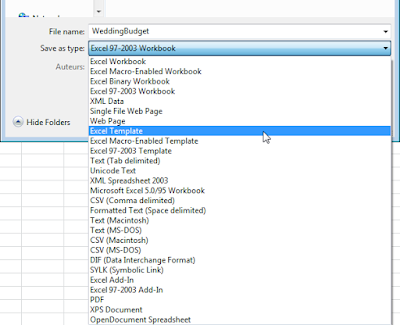
excel templates, free spreadsheet templates, templates in excel, create excel templates, templates excel
  • Enter the File Name that you want to use for the template.
  • Select Excel Template from the Save as type box.
  • Click on Save Button.
Excel automatically create a template in the Template folder and available when you want to use it to create a new workbook.

Use an Existing Template to Create a New Workbook

If you have any excel template in the excel template folder and want to use existing template in a new workbook then you need to know how to use free excel spreadsheet template in the new workbook. For use existing template follow some steps as following:
  • On the File Tab, Click New.
  • To choose a Template from Available Templates,do following:
    • To select the Recently used Template, Click Recent Templates then under Recent Templates, Double-Click on the Template that you want to use in your workbook.
    • To select the Sample Template that already exist in excel, Click Sample Templates and under Sample Templates, Double-Click on the Template that can use in your workbook.
    excel templates, free spreadsheet templates, templates in excel, create excel templates, templates excel
    • To Select My Templates that created by you, Click My Templates then under My Templates, Double-Click on the Template that you want to use in your workbook.
    • To Select the Template of another workbook, Click New from existing then Double-Click on the workbook that you want to use.

    Conclusion:
    Thus, in this post, you learn how to create an Excel Workbook with a Template and some required information to use the excel spreadsheet templates in another workbook. You can create a worksheet based on an existing template or also create your own templates which can use further to create another excel workbook. If you like this post then you can share with your friends and colleagues. We'll update the information on the regular basis. I hope you'll like this post. You can also share it on facebook, Instagram, Google+ or other social media website. If you have any query or suggestion  regarding this post then you can freely write in the comment section. We'll revert back to you as soon as possible.